
.png)
Description
Download Whattopack – AI‑Powered Travel Packing Assistant, Free & Secure
Overview: Why Whattopack Is the Ultimate Packing Companion
Traveling can feel like a balancing act: you want to bring everything you might need, yet you dread the weight of an overstuffed suitcase. Whattopack steps in as a smart, AI‑driven travel packing tool that eliminates guesswork and streamlines the entire process. By analyzing your destination, travel dates, season, and personal style, the app generates a hyper‑personalized packing list that evolves as you add or remove items. Whether you’re heading to a tropical beach in July, a snow‑capped Alpine village in December, or a bustling city for a business conference, Whattopack tailors recommendations to match climate, cultural norms, and activity‑specific gear.
What sets Whattopack apart is its continuous learning engine. The more you interact with the app—by confirming, rejecting, or editing suggestions—the better it becomes at predicting your preferences. This means the first list you receive might be a solid starting point, but by the second or third trip, Whattopack will anticipate the exact shoes, adapters, and toiletries you habitually pack. Beyond items, the platform offers real‑time destination insights: up‑to‑date weather forecasts, local etiquette notes (e.g., dress codes for religious sites), recommended activities, and safety alerts. All of this is bundled in a clean, user‑friendly interface that works across desktop browsers and mobile devices, making it a reliable travel companion wherever you are.
Security and privacy are built into the core. Your travel data never leaves your device without encryption, and you retain full control over what you share. Plus, Whattopack is free to download, with optional premium upgrades for advanced analytics, offline access, and integration with popular itinerary planners. In short, if you’ve ever stood in front of an open suitcase, overwhelmed by “what ifs,” Whattopack promises to turn that chaos into confidence—so you can focus on the excitement of the journey ahead.
Key Features That Make Whattopack Stand Out
- AI‑Personalized Packing Lists: Uses machine‑learning to adapt suggestions based on your past packing habits and the specifics of each trip.
- Season & Weather Integration: Pulls real‑time forecasts and historical climate data to recommend appropriate clothing layers, accessories, and gear.
- Cultural & Safety Insights: Provides quick tips on local dress codes, customs, and safety considerations, reducing the risk of cultural faux pas.
- Real‑Time List Editing: Drag‑and‑drop interface lets you add, remove, or reorder items instantly, with instant feedback on weight and space optimization.
- Multi‑Device Sync: Your packing list syncs across desktop, iOS, and Android, ensuring you have access whether you’re at home or at the airport.
- Offline Mode (Premium): Download your list and destination insights for use without an internet connection.
- Integration with Travel Apps: Connects with popular itinerary managers (TripIt, Google Trips) to import flight dates, hotel stays, and activity schedules.
- Weight & Space Calculator: Estimates total suitcase weight and suggests compact alternatives, helping you avoid airline fees.
- Smart Notifications: Alerts you when a recommended item conflicts with airline restrictions (e.g., prohibited liquids) or when weather forecasts change.
- Privacy‑First Architecture: All personal data is encrypted, stored locally by default, and never sold to third parties.
Installation, Usage & Compatibility Guide
Getting started with Whattopack is straightforward and takes just a few minutes. First, visit the official website or your device’s app store and click “Download.” The installer is lightweight (under 20 MB) and compatible with the major operating systems listed below. After the download completes, run the installer on Windows 10/11, macOS 12+, Android 8.0+, or iOS 13+. The setup wizard walks you through granting necessary permissions—such as location access for accurate weather data and storage access for saving your lists.
Once installed, launch Whattopack and create a free account using an email address or social login (Google, Apple). The onboarding flow asks a few quick questions: your typical travel style (backpacker, business, family), preferred clothing brands, and any special needs (e.g., medical equipment). This information seeds the AI engine, enabling it to suggest items that match your personal taste right from the first trip.
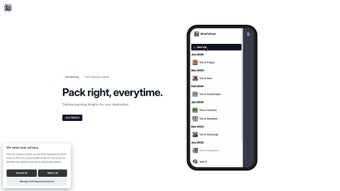
To start a new packing list, click “New Trip,” then enter your destination, travel dates, and purpose (leisure, work, adventure). Whattopack instantly pulls weather forecasts, local customs, and activity suggestions. The AI then generates a preliminary list, which you can edit by dragging items into “Essentials,” “Optional,” or “Leave‑Behind” categories. As you add or remove items, the app recalculates estimated weight and alerts you if you approach airline limits.
Compatibility details:
- Windows: 10, 11 (64‑bit)
- macOS: 12 Monterey and later (Intel & Apple Silicon)
- Android: 8.0 Oreo and above
- iOS: 13 and later (iPhone, iPad)
For power users, Whattopack offers a command‑line interface (CLI) on Windows and macOS that allows batch importing of itinerary data via CSV. This feature is part of the premium tier but demonstrates the app’s flexibility for tech‑savvy travelers who manage multiple trips simultaneously.
After you’ve finalized your list, you can export it as a PDF, share it with travel companions, or sync it with your preferred luggage scale via Bluetooth (available on premium). The app also supports voice commands on mobile devices, letting you add items hands‑free while you’re on the move.
Pros & Cons – An Honest Assessment
Pros
- Highly accurate AI recommendations that improve with each use.
- Comprehensive destination insights (weather, culture, safety) in one place.
- Cross‑platform compatibility ensures seamless access on any device.
- Free core version offers robust functionality without hidden fees.
- Privacy‑first design with local data storage and end‑to‑end encryption.
- Weight and space calculator helps avoid costly airline baggage fees.
- Integration with popular travel itinerary apps streamlines workflow.
- Offline mode for premium users guarantees access in low‑connectivity regions.
- Intuitive drag‑and‑drop UI makes list editing fast and enjoyable.
- Responsive customer support and active community forums.
Cons
- Advanced analytics and offline mode are locked behind a premium subscription.
- Initial AI suggestions may be generic until the system learns your habits.
- Requires internet connection for real‑time weather and cultural updates (unless offline mode is enabled).
- Some users report a slight learning curve with the CLI feature.
- Limited customization of the UI theme (currently only light and dark modes).
Frequently Asked Questions & Final Thoughts
Is Whattopack really free to use?
Yes, the core packing and destination insight features are completely free. Premium upgrades (offline mode, advanced analytics, and deeper itinerary integrations) are optional and offered via a monthly or annual subscription.
Can I use Whattopack without an internet connection?
Offline access is available for premium subscribers. Free users need an internet connection to fetch real‑time weather and cultural data, but they can still view and edit previously saved lists locally.
How does Whattopack protect my personal data?
All user data is encrypted at rest and in transit. By default, lists are stored locally on your device, and any cloud sync is optional and also encrypted. Whattopack does not sell or share data with third parties.
Does Whattopack work with my existing travel itinerary apps?
Yes, Whattopack integrates with TripIt, Google Trips, and Apple Wallet. You can import flight numbers, hotel bookings, and activity schedules with a single tap, allowing the AI to fine‑tune packing recommendations based on exact dates and locations.
What platforms are supported?
Whattopack is available on Windows 10/11, macOS 12+, Android 8.0+, and iOS 13+. The web version works on any modern browser, providing flexibility for users who prefer a desktop‑only workflow.
Conclusion – Pack Smarter, Travel Happier
In a world where every gram counts and cultural nuances can make or break a trip, Whattopack offers a powerful, AI‑backed solution that takes the stress out of packing. Its blend of personalized lists, real‑time destination insights, and seamless cross‑device syncing makes it an indispensable tool for solo adventurers, families, and business travelers alike. While the premium tier unlocks the most advanced features, the free version already provides enough value to revolutionize the way you approach luggage.
Ready to travel lighter, smarter, and with confidence? Download Whattopack today and experience the future of travel preparation. Your next adventure starts with a well‑packed bag—let Whattopack do the heavy lifting for you.
Guides & Tutorials for Whattopack
How to install Whattopack
- Click the Preview / Download button above.
- Once redirected, accept the terms and click Install.
- Wait for the Whattopack download to finish on your device.
How to use Whattopack
This software is primarily used for its core features described above. Open the app after installation to explore its capabilities.
User Reviews for Whattopack 0
No reviews found




